Packages are billed in USD. Every new store starts on Grow with the first month included, so nothing is due on day one. You need the store owner or billing permission to change plans.
Open Settings > Billing
The top card shows your current package, whether it is Active, the renewal date and the platform transaction fee. The Usage card shows products, orders and staff against your plan limits.
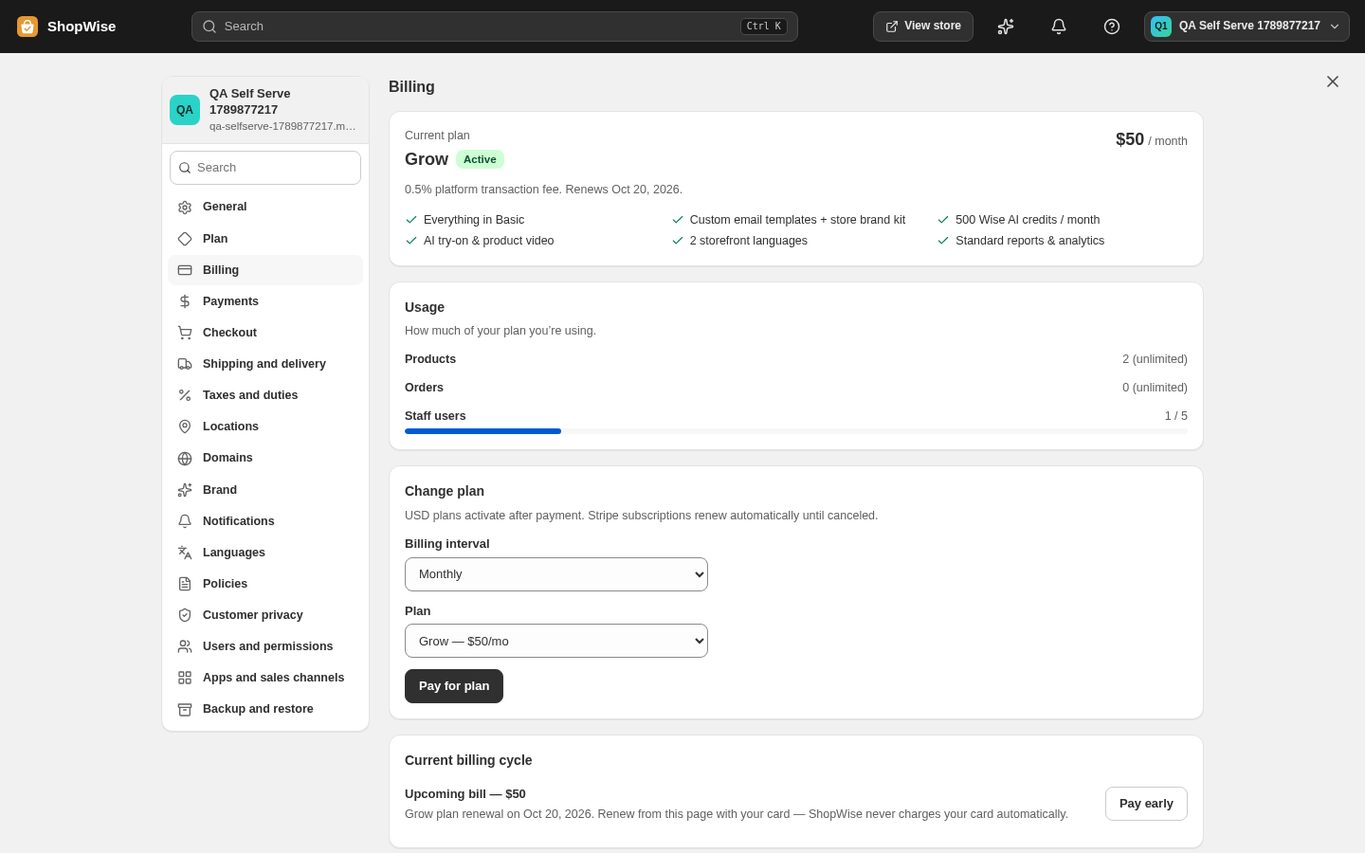
Pick the billing interval and the plan
Under "Change plan" choose Monthly or Yearly (yearly is cheaper per month) and pick Basic, Grow or Advanced from the plan dropdown. Plus is a custom agreement arranged with the team.
Click "Pay for plan"
A payment window opens on the platform's payment provider. Pay by card there and close the window when it reports the payment complete. Back in Billing, the card shows the new package as Active with the next renewal date. Nothing is switched until the payment succeeds.
Renewals
Lulu never charges your card automatically. When a renewal is due you receive reminder emails, and you pay from the same page with "Pay early" (under Current billing cycle) or "Pay for plan". Your package stays active until the renewal date shown.
CHECK YOUR WORK
You’re ready when…
- Billing shows the package you paid for as Active.
- The renewal date moved forward by one month or one year.
- You kept the payment confirmation from the payment window.
IF SOMETHING DOESN’T LOOK RIGHT
Troubleshooting
The payment window says the payment could not start, or closes without a result.
Nothing was charged and your current package, theme or app tier stays exactly as it was. Try again in a few minutes. If it keeps failing, the platform's card payment provider is not live yet for this region: contact support with your store address and what you were paying for, and the team will complete the activation with you.
I paid but Billing still shows the old package.
Reload the Billing page. If it has not changed after a few minutes, send support your store address and the payment reference from the payment window; do not pay again.
I cannot find this page or action.
Check the store shown at the top of the admin. On a phone, open the navigation menu first. Ask the store owner to confirm your permissions and whether the feature is available for this store.
What should I send support?
Send your store address, the page you were using, the steps you took, and the exact error text. Include a screenshot with private customer details hidden. Do not share passwords, API keys, or full payment information.
Keep going
- Open your Lulu store: from signup to going live →
- Choose a package and understand billing →
- Billing: invoices, app charges, and plan changes →
- Install apps and pay for app plans →