Use the partner account that owns the app. Listing edits become public immediately.
Open the owned app
Go to Listings, switch to the Apps tab and choose Edit on the app. Review Name, Tagline, Description, Category, Pricing and Icon.
- Pricing is a four-way selector: Free, Free plan available, Free to install, or Free trial. A pricing label does not configure a billing plan.
- Icon takes an emoji, an https:// URL or a /media path. Host your icon yourself.
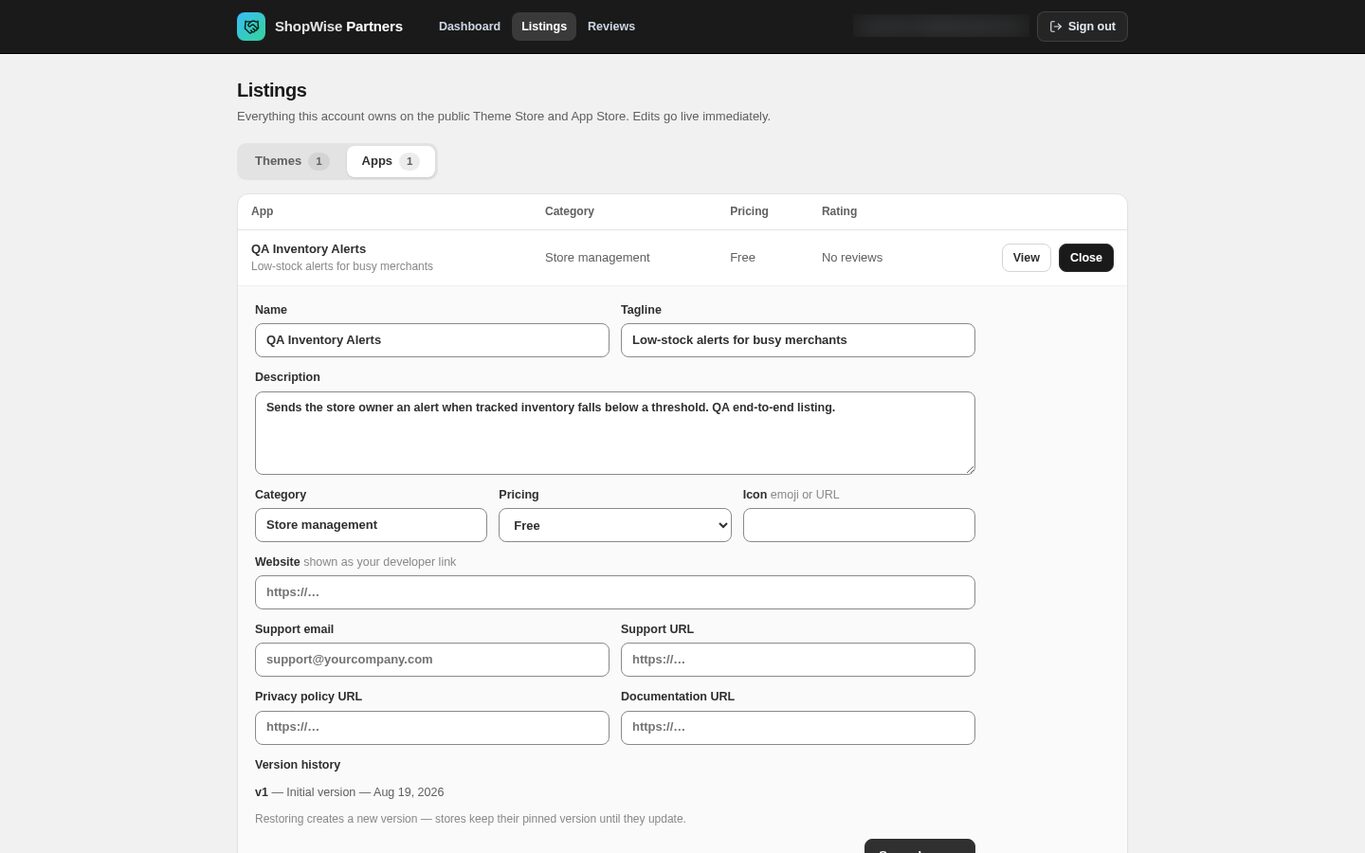
Maintain the support information
Fill in Website, Support email, Support URL, Privacy policy URL and Documentation URL.
- Every URL must start with https://.
- These appear in the support block on the public listing and in the merchant's admin.
- Open each destination and check it before saving.
Save a release
Choose Save changes, then open the public listing to check the result. Every save is recorded in Version history, newest first.
- The public App Store reads this row directly, so an edit is live as soon as it saves.
- This editor does not change app scopes, billing plans, embeds or executable code; coordinate those with Lulu.
Restore an earlier version
In Version history find the release you want and choose Restore on it. Restore is offered on every entry except the newest.
- Restore copies that version's values back and records the result as a new release called “Restored from v<n>”; history is appended to, never rewritten.
- Stores stay on the version they are pinned to until their owner updates the app, so a restore is not a mass rollback.
CHECK YOUR WORK
You’re ready when…
- Public listing details and links are correct.
- The new release appears in version history.
- You know which changes need Lulu to make them.
IF SOMETHING DOESN’T LOOK RIGHT
Troubleshooting
Will restoring an app listing roll back every store?
No. Restore creates a new version of the listing; installed stores keep their pinned version until they update. It is not a mass rollback of merchant installations.
Why is there no Restore button?
Restore is not offered on the newest release, because that is the one already live. A listing with only one release therefore shows no Restore button.
Why is a control missing or unavailable?
Confirm that you are in the correct store and that your role allows this action. Optional apps and channels may require installation, a plan, or activation. Share the screen name and error with support if access is still unclear.
Keep going
- Apps: permissions, updates, and uninstalling →
- Partners: submit an app listing →
- Partners: review, approval and publication →